What's PLANERGY?

Modern Spend Management and Accounts Payable software.

Helping organizations spend smarter and more efficiently by automating purchasing and invoice processing.

We saved more than $1 million on our spend in the first year and just recently identified an opportunity to save about $10,000 every month on recurring expenses with PLANERGY.

King Ocean Logo

Cristian Maradiaga

King Ocean

Download a free copy of "Preparing Your AP Department For The Future", to learn:

  • How to transition from paper and excel to eInvoicing.
  • How AP can improve relationships with your key suppliers.
  • How to capture early payment discounts and avoid late payment penalties.
  • How better management in AP can give you better flexibility for cash flow management.

E-Billing Solutions: Automate Invoicing & Cut Costs

KEY TAKEAWAYS

  • E-billing streamlines bill payment and invoicing, delivering increased efficiency, cost savings, and real-time visibility into payment history and cash flow.
  • Traditional billing methods are often time-consuming, prone to errors, and require manual processing of payments, which can slow down operations and increase expenses.
  • Automating invoicing with e-billing solutions eliminates manual tasks, integrates with dashboards and payment portals, and helps businesses stay compliant while reducing friction for both staff and customers.

Managing invoices and payments is a critical yet complex task for businesses. With the advent of e-billing solutions, companies can now streamline this process, save costs, and improve operational efficiency.

But what exactly is e-billing, and how does it work?

This guide dives deep into the workings of e-billing, its top benefits, and why so many businesses are making the switch to automation.

What Is E-Billing?

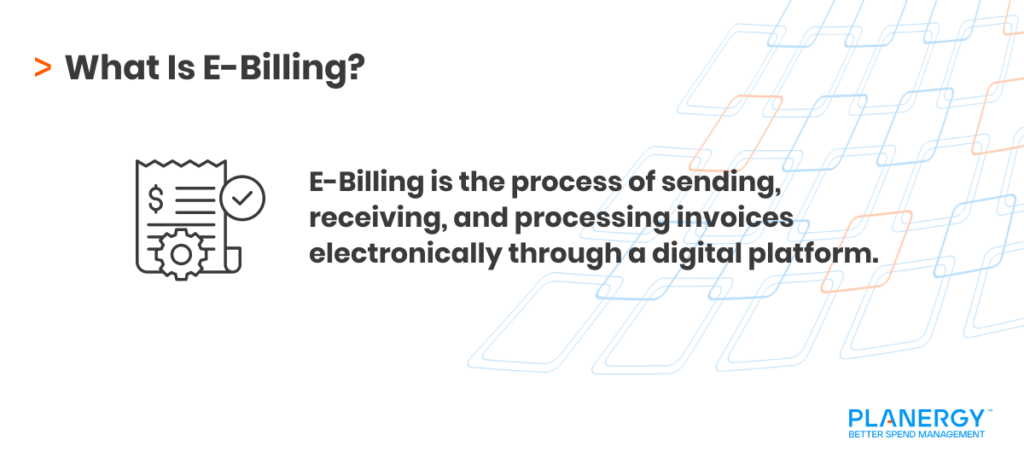
E-billing, or electronic billing, refers to the process of sending, receiving, and processing invoices electronically.

Unlike traditional paper-based invoicing, e-billing leverages technology to create a fully digital workflow, eliminating the need for manual input and paper documentation.
What Is E-Billing?

How does it work?

At its core, an e-billing system enables businesses to send invoices digitally via platforms such as email or cloud-based applications. Recipients can then review invoices, approve payments, and settle amounts online.

This is often facilitated through software tools that integrate with accounting systems, ensuring all financial data is seamlessly recorded and reconciled.

Key Features of E-Billing:

Invoice Automation
Automatically generate and deliver invoices to customers.

Digital Payment Options
Enable direct online bill payment through credit cards, ACH, integration with a bank account, or other secure methods within a centralized dashboard or payment portal.

Real-Time Tracking
Monitor invoice statuses, such as sent, received, or paid, within seconds.

Compliance Tools
Ensure adherence to local tax codes and legal requirements.

By digitizing these steps, e-billing significantly reduces errors, accelerates cash flow, and cuts operational expenses.

Key Features Of E-Billing

Benefits of E-Billing

Adopting e-billing solutions comes with a host of advantages that enhance workplace efficiency and improve financial health.

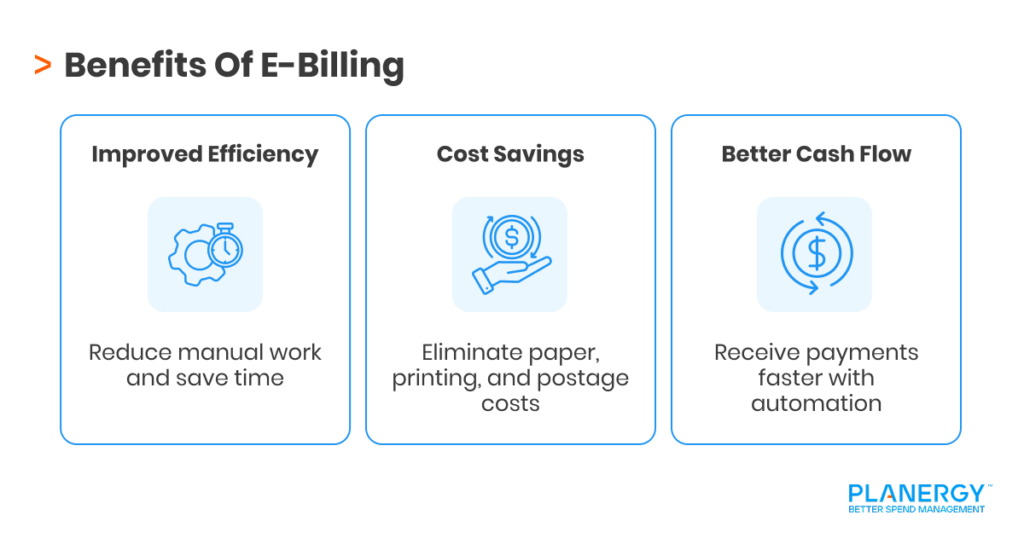
Benefits Of E-Billing

Improved Efficiency

Manual invoicing processes are labor-intensive and time-consuming. Employees spend time on tasks like data entry, reviews, and reconciliations. E-billing automation eliminates these bottlenecks, enabling your team to focus on more strategic priorities.

Cost Savings

Paper invoices come with hidden costs, including paper, printing, postage, and manual labor. Every step of the traditional billing cycle adds unnecessary expenses.

E-billing, by supporting fully digital transactions and automatic payments, not only reduces these costs but also offers clearer pricing estimates via dashboard overviews.

Enhanced Cash Flow

With e-billing, invoices and bill payments are delivered and processed faster, resulting in quicker payment cycles. Many platforms also offer automated reminders for due bill payments, enrollment in automatic payments, and easy access to payment history.

 All of this helps minimize delays and support stronger cash flow management.

E-Billing vs. Manual Processes

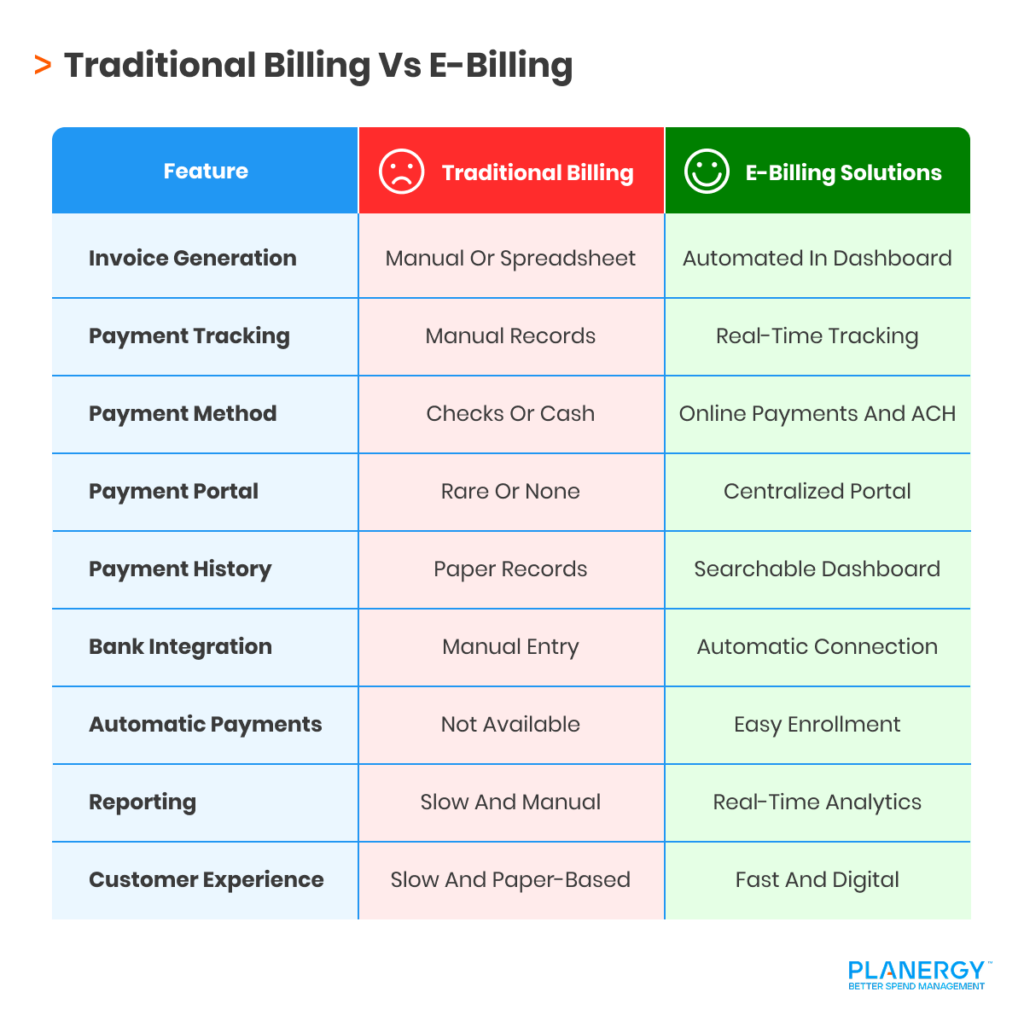
Traditional invoicing methods rely heavily on manual tasks, such as creating invoices in spreadsheets, then printing and mailing them, and tracking payments by hand. These processes are prone to human error, slow turnaround times, and unnecessary costs.

Manual (Traditional Billing) vs. E-Billing: At a Glance

Traditional Billing Vs E-Billing

Feature

Traditional Billing

E-Billing Solutions

Invoice Generation

Manual/spreadsheet-based

Automated and scheduled in dashboard

Bill Payment Tracking

By hand, paper records required

Digital, real-time, always available in payment history

Payment Method

Checks, cash, mail-in

Electronic payment, ACH, online payment portal

Payment Portal Access

Rare or non-existent

Central hub for billing, statements, enrollment

Payment History

Scattered, often lost in paperwork

Centralized and searchable dashboard

Bank Account Integration

Manual bank entry or deposits

Automated, direct connection for bill payment, reconciliation

Automatic Payments

Not supported

Easy enrollment and management through dashboard

Pricing & Reporting

Slow, error-prone manual calculation

Real-time pricing and analytics via dashboard

Customer Experience

Slower and paper-based

Fast, transparent, digital, user-friendly payment portal

E-billing automates and simplifies every stage of the lifecycle, replacing slow, error-prone manual tasks with efficient and transparent digital workflows. This leads to improved accuracy, faster payments, and significant cost savings, empowering your accounts payable team to focus on higher-value activities.

Eliminating the need to:

  • Generate and mail paper bills.
  • Manually track payment due dates.
  • Follow up on overdue payments with phone calls.
  • Manually reconcile accounts.
  • File and store physical paperwork.

This means improved productivity and a better customer experience through smooth, transparent payment options.

Understanding Electronic Invoice Presentment and Payment (EIPP)

A key part of e-billing is Electronic Invoice Presentment and Payment (EIPP). This technology allows businesses to send invoices through a secure online portal, where customers can view, dispute, and pay them in a single, user-friendly interface.

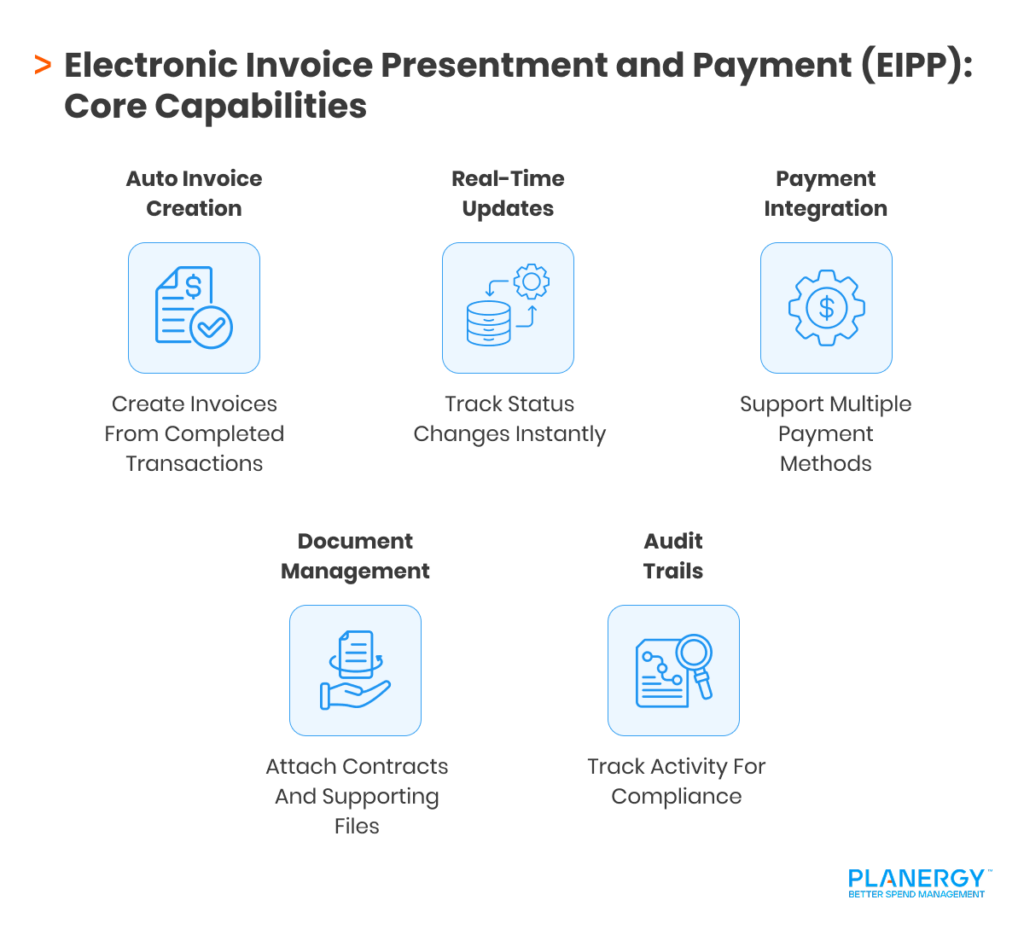
Electronic Invoice Presentment and Payment (EIPP) Core Capabilities

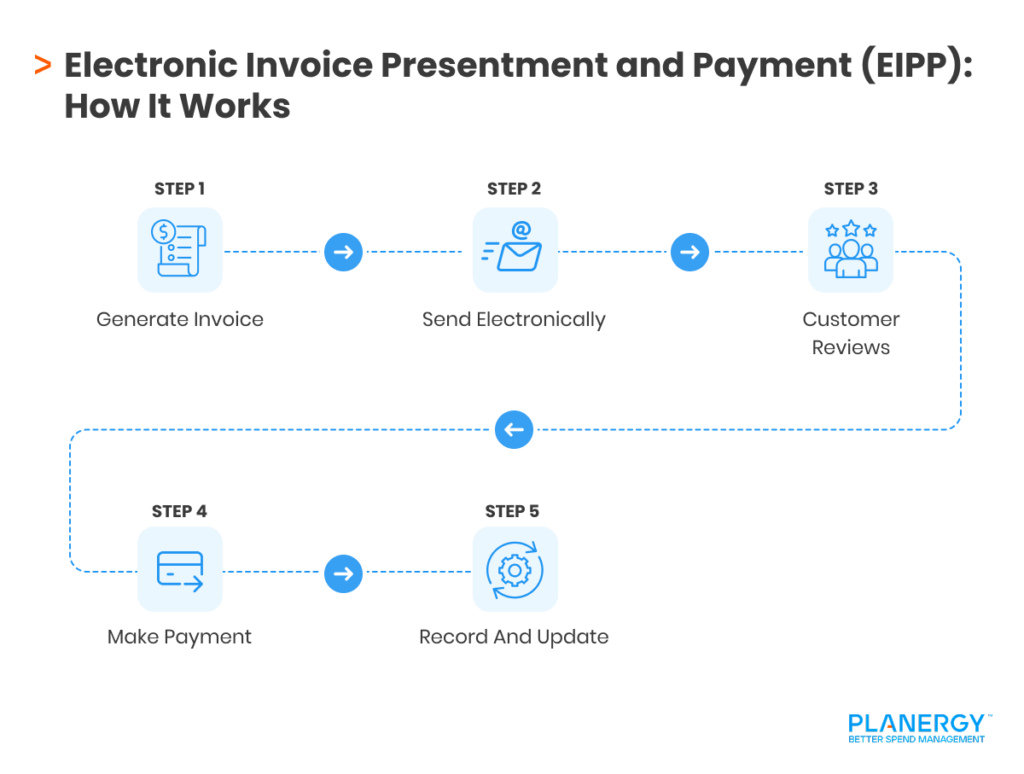
How EIPP Works

EIPP systems integrate with existing accounting software to automatically generate electronic invoices based on completed sales or services.

EIPP systems integrate with existing finance or accounting software to automatically generate invoices once a sale is completed or a service is delivered.

These invoices are then delivered instantly via email notifications, secure portals, or direct integration with customer systems.

How EIPP Works

EIPP platforms streamline the process by combining automated invoice creation and delivery with real-time status tracking, giving finance teams clear visibility into when invoices are viewed, approved, or paid.

They also include integrated payment gateways, enabling customers to pay via Automated Clearing House (ACH) transfers, credit cards, wire transfers, or other electronic methods.

Supporting documents—such as contracts or purchase orders—can be attached directly to invoices to reduce queries and disputes.

Meanwhile, workflow automation helps manage approvals, schedule payments, and send reminders, while comprehensive audit trails ensure compliance with regulatory requirements.

Benefits of EIPP

  • Centralized platform for managing incoming and outgoing invoices.
  • Faster payment processing due to integrated payment options.
  • Enhanced customer satisfaction with transparent transaction histories.

By integrating EIPP into billing processes, businesses can create an efficient, scalable payment system that supports long-term growth.

Integrating E-Billing Solutions with Existing Systems

The good news is that adopting new e-billing software doesn’t mean overhauling your whole system.

Today’s tools are designed to seamlessly integrate with your existing enterprise resource planning (ERP) and customer relationship management (CRM) setup.

Connecting your electronic billing system to other tools gives you greater flexibility with workflow automation.

Once connected to your ERP, you get real-time visibility into your financial data, including payments, outstanding invoices, and cash flow across your organization.

Integration with CRM ensures you can automate customer communication and follow-ups. For example, you can trigger reminders for overdue invoices, send receipts, or update client profiles based on payment activity.

Integration reduces friction with:

  • Data Synchronization
    Automatically updates accounting records, removing the need for duplicate data entry.

  • Scalability
    Adapts to growing transaction volumes without additional manual oversight.

  • Custom Reporting
    Generates detailed reports (for faster and easier data analysis) by pulling data from multiple platforms in real time.

As you map out your integration strategy, prioritize systems that will create the most value for your organization. Look for service providers that offer a strong API or pre-built connectors. You’ll end up with a more agile, coordinated financial function.

E-Billing Security and Compliance

Financial data is subject to stringent regulations, and penalties for data breaches can be quite steep. E-billing solutions prioritize data protection and regulatory adherence at every stage of the invoicing process.

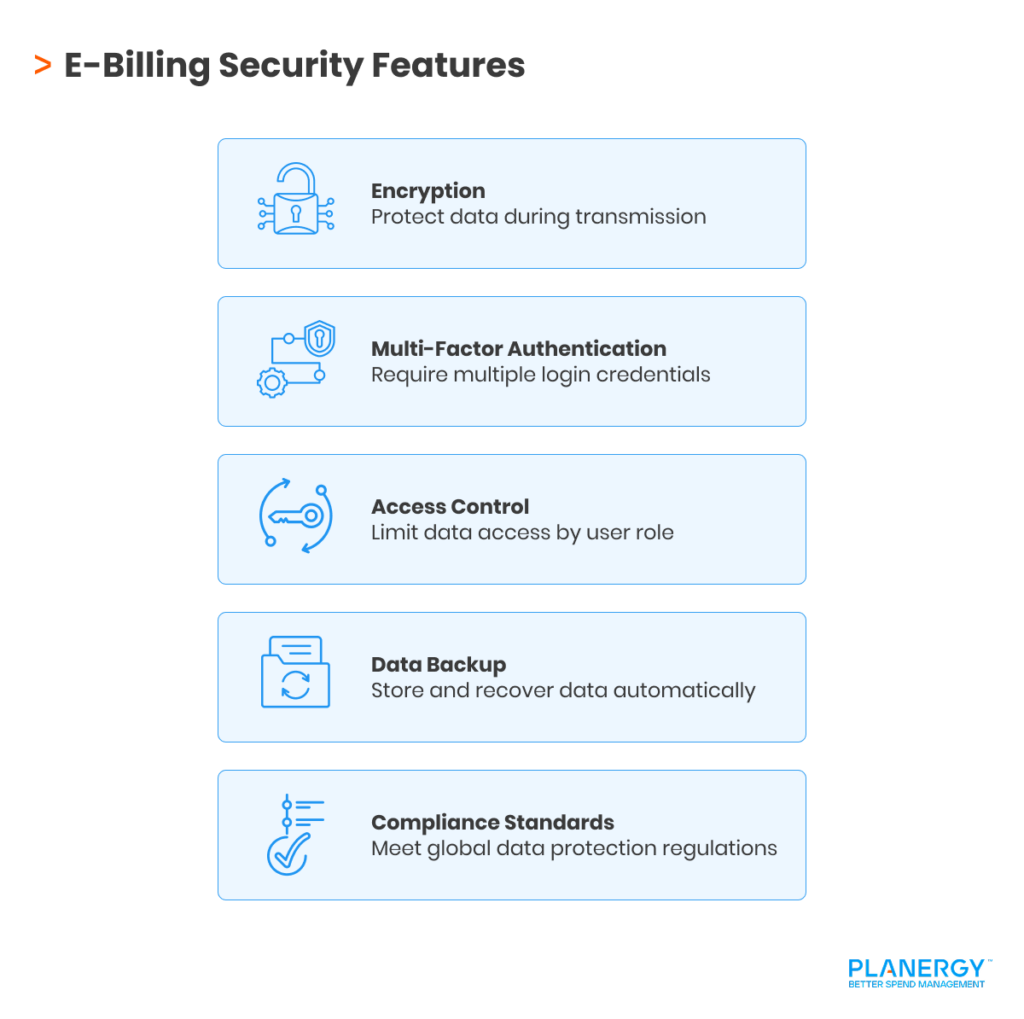
Modern platforms implement multiple layers of security, such as:

E-Billing Security Measures

End-to-End Encryption
All invoice transmissions are secured using industry-standard encryption protocols (like TLS and AES) to ensure sensitive information stays protected from unauthorized access or cyber threats.

Multi-Factor Authentication (MFA)
Requiring multiple credentials to access financial data reduces the risk of account compromise, adding a crucial layer of user verification.

Role-Based Access Controls
System administrators can assign permissions according to job function, limiting sensitive information only to authorized personnel.

Data Backup and Disaster Recovery
Automated backup protocols ensure that transaction data is regularly saved and can be restored quickly in case of any data loss or cyber incident.

On the compliance front, e-billing solutions help organizations adhere to a range of global and industry-specific regulations, including:

SOC 2 (Service Organization Control 2)
Ensures strict controls on security, availability, processing integrity, confidentiality, and privacy of customer data.

GDPR (General Data Protection Regulation)

Protects personal data for individuals in the European Union, mandating robust measures for data handling, processing, and breach notifications.

PCI DSS (Payment Card Industry Data Security Standard)

Critical for organizations processing credit card payments, ensuring secure handling and storage of payment data.

Local Tax Compliance
E-billing platforms often include features to comply with specific regional tax regulations and electronic invoicing mandates (such as Italy’s FatturaPA or Brazil’s NF-e).

As a business, there are things you can do to protect security and compliance. This includes using encryption technology to secure invoice transactions and implementing user access controls to prevent unauthorized entry.

Use role-based access and least privilege (giving each person only access to the things they need to do their job) so that employees cannot access data beyond what they need.

Regular security and compliance audits are crucial for maintaining trust and preventing breaches. Audits help uncover vulnerabilities, verify that controls are working as intended, and demonstrate due diligence to regulators and business partners.

You should schedule routine assessments, monitor systems for suspicious activity, and stay current on evolving threats and new compliance requirements.

Strategies for Successful Implementation and User Adoption

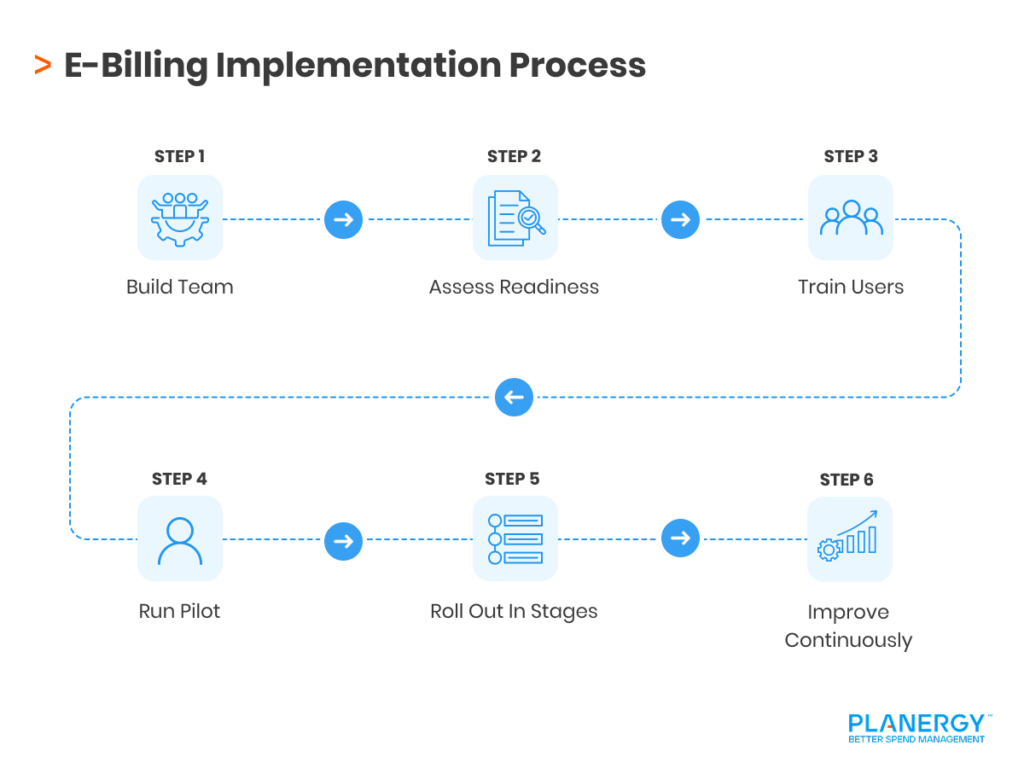
Switching to an e-billing process requires careful planning to ensure a smooth transition.

E-Billing Implementation Process

Build a Cross-Functional Implementation Team

Assemble a project team with representatives from finance, IT, operations, and customer service.

A collaborative approach ensures diverse perspectives, reduces silos, and accelerates decision-making. Assign clear roles and responsibilities to streamline the rollout.

Assess Readiness and Set Clear Objectives

Conduct a readiness assessment to identify technology gaps and staff training needs. Define measurable goals, such as reducing invoice processing time or increasing on-time payments, to help monitor progress and align the team around common outcomes.

Provide Comprehensive Training

Develop a tailored training program supported by hands-on workshops, easy-to-follow guides, and live demos. Offer ongoing resources for both employees and customers, such as FAQ documents and access to a dedicated help desk.

Start with a Small Pilot Program

Start with a small-scale implementation in one department or a select group of clients. Collect feedback on user experience and identify workflow issues. Use these insights to make targeted improvements before expanding organization-wide.

Proactively Address Resistance to Change

Communicate the benefits of e-billing early and often, showing how automation reduces manual workload and supports business objectives. Share success stories from pilot users and invite employees to voice concerns or suggest improvements.

Roll Out Changes in Stages

Rather than a big-bang launch, roll out e-billing features in stages. For example, automate invoice creation and delivery first, then progressively digitize payment reminders, reconciliations, and reporting.

This phased approach allows users to build confidence and adapt at a manageable pace.

Foster Client Communication and Onboarding

Notify customers in advance about the upcoming changes. Offer step-by-step onboarding sessions and dedicated support channels to address questions quickly.

Consider creating short video tutorials or webinars to demonstrate the customer portal and payment options.

Aim for Continuous Improvement

Create mechanisms for collecting feedback from both employees and customers, such as surveys, suggestion boxes, or periodic roundtable discussions.

Use this input to refine workflows, enhance user experience, and keep the system evolving in response to real-world needs.

Take the Next Step with E-Billing

E-billing is transforming how organizations manage invoices and collect payments, offering a faster, more efficient, and cost-effective alternative to manual processes.

With improved visibility, stronger cash flow, and reduced admin burden, it’s now an essential capability for finance teams looking to scale and remain competitive

But as invoice volumes grow and compliance expectations increase, basic digitization alone isn’t enough. Businesses need solutions that not only automate invoicing, but also bring control, consistency, and real-time insight across the entire process.

Modern platforms like PLANERGY go beyond e-billing by combining automation, workflow control, and full visibility into spending and payments. This helps finance teams reduce risk, stay audit-ready, and operate more efficiently without adding complexity.

If you’re looking to move beyond manual processes and build a more streamlined, scalable finance function, it’s worth exploring what a fully integrated approach to e-billing and spend management can deliver.

What’s your goal today?

1. Use PLANERGY to manage purchasing and accounts payable

We’ve helped save billions of dollars for our clients through better spend management, process automation in purchasing and finance, and reducing financial risks. To discover how we can help grow your business:

2. Download our guide “Preparing Your AP Department For The Future”

Download a free copy of our guide to future proofing your accounts payable department. You’ll also be subscribed to our email newsletter and notified about new articles or if have something interesting to share.

3. Learn best practices for purchasing, finance, and more

Browse hundreds of articles, containing an amazing number of useful tools, techniques, and best practices. Many readers tell us they would have paid consultants for the advice in these articles.

Business is Our Business

Stay up-to-date with news sent straight to your inbox

PLANERGY LOGO

Sign up with your email to receive updates from our blog